Common Database Design Mistakes
 Althaf Mohamed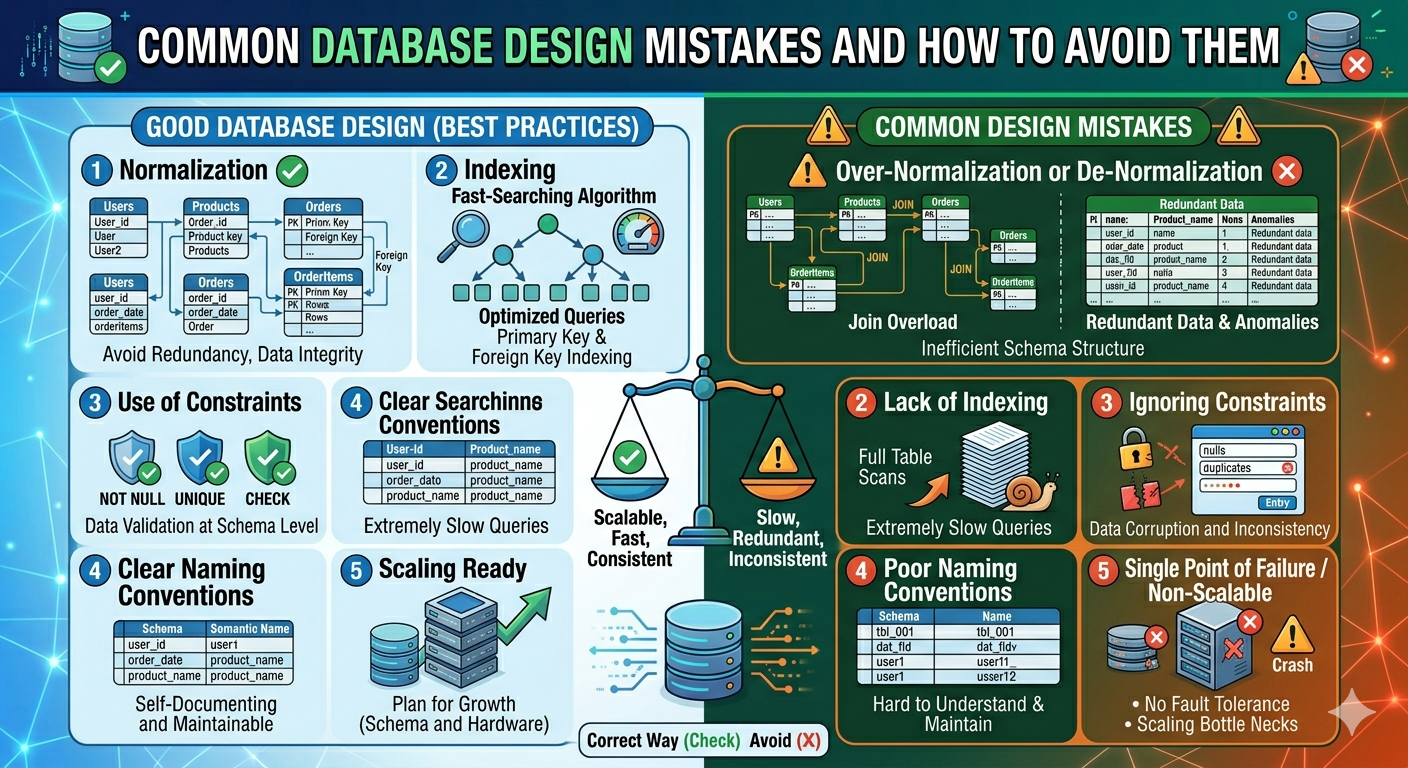
Designing a database is a crucial phase in developing any application. A well-organized database ensures performance, scalability, and data consistency. However, even experienced developers often make common mistakes that result in slow queries, data duplication, and maintenance issues.
These mistakes may appear small at first, but they can have major issues as the application expands. Understanding these common database design errors—and how to prevent them—is critical for developing reliable and effective systems.
Database Mistakes & Avoiding Methods
Poor Naming Conventions
One of the most common mistakes in database design is using unclear, inconsistent, or meaningless names for tables and columns. Naming conventions are critical because they allow developers, database administrators, and analysts to immediately understand the database's structure and purpose. Poorly named objects can confuse a database, make it difficult to maintain, and increase the potential of errors.
For example, table names such as tbl1, data, x1, or temp do not clearly describe what information is being stored. When another developer sees these names, they may need to manually review the data to determine the table's function. This delays development and raises the possibility of errors.
How to Avoid It
Choosing meaningful table and column names is critical for clarity in database design. Names should accurately describe their content, such as "customers," "orders," "product_categories," "employees," and "invoice_items." This approach improves understanding and maintenance of the database structure.
To ensure database clarity and consistency, use a consistent naming convention, such as all lowercase with underscores (e.g., customer_orders) or camelCase (e.g., customerOrders).
Table names should consistently be either singular (e.g., customer) or plural (e.g., customers) throughout the entire schema.
Use clear terms like customer_id instead of ambiguous abbreviations like cid.
Using clear and descriptive names for foreign keys, such as customer_id, order_id, and product_id, improves readability and understanding in database design.
Missing Primary Keys
A Primary Key is a column or set of columns that uniquely identifies each entry in a database table. It ensures that each row has its own unique identification and can be safely retrieved from other tables.
Without a primary key, the database cannot ensure that each record is unique. This might result in duplicate entries, incorrect data, and issues when editing or deleting individual records. It is also significantly more difficult to construct relationships between tables because foreign keys rely on primary keys to reference data correctly.
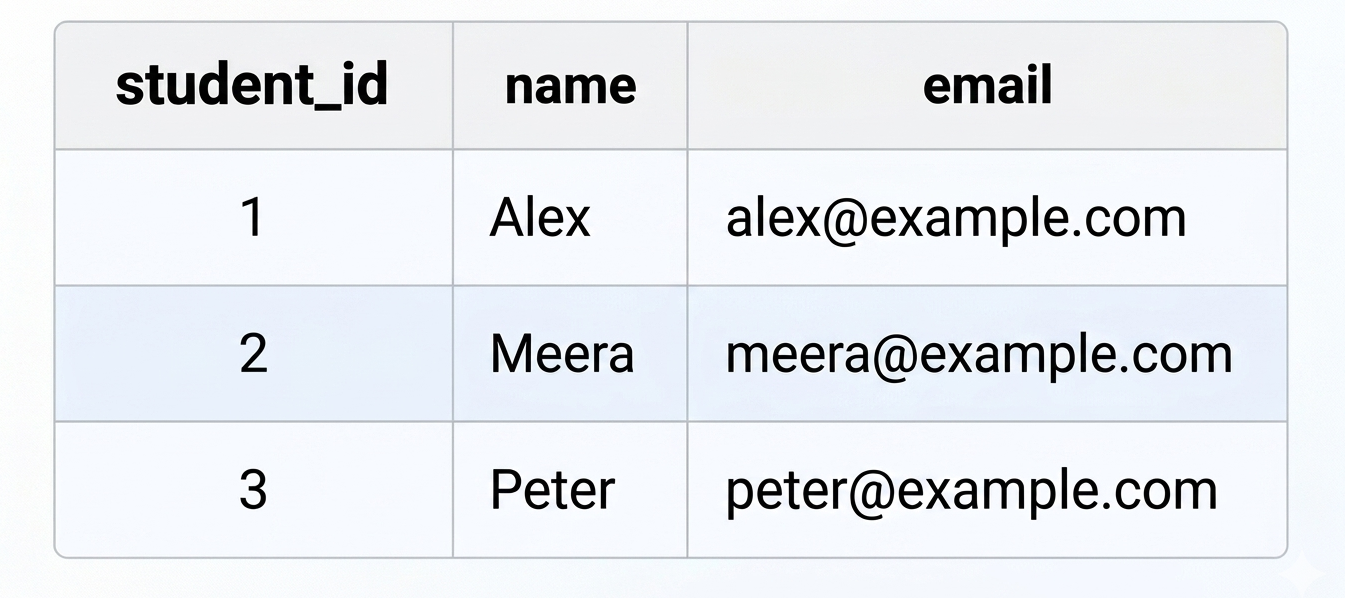
In this table, student_id is the primary key. Each student has a unique ID, making it easy to retrieve a specific student, update the correct record, delete a record safely, create relationships with other tables such as enrollments or payments.
If the table does not contain a primary key, duplicate records may be inserted:
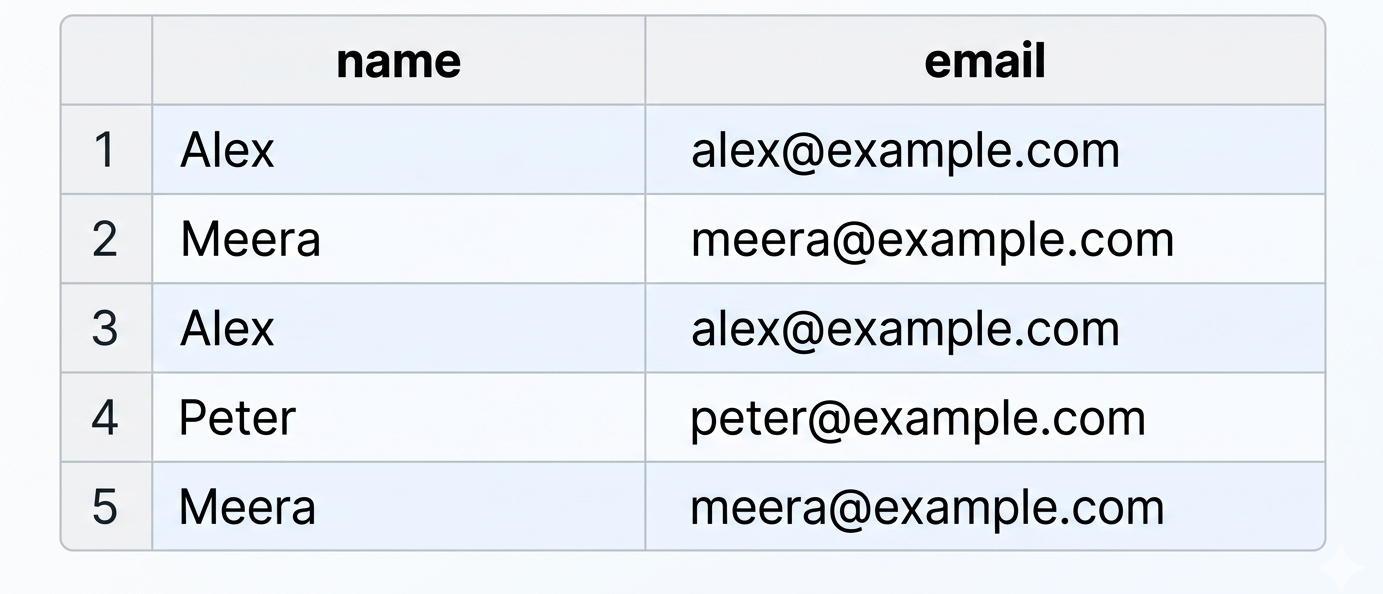
In this situation, it becomes unclear which record should be updated or deleted, and related tables cannot reference a student reliably.
How to Avoid them
Define a primary key for every table in the database
Use auto-increment numeric IDs when appropriate
Use UUIDs when globally unique identifiers are preferred
Ensure the primary key is always unique and not null
Data Redundancy
Data redundancy arises when the same piece of information is recorded in several tables or entries in a database. While this may appear easy at first, it can lead to major issues as the database grows. Redundant data loses storage space, requires more maintenance effort, and frequently results in inconsistencies when one copy of the data is updated while others stay unchanged.
The best practice in database design is to store each piece of information just once and then refer to it using keys and relationships.
How to Avoid Data Redundancy
Normalize Database - Normalization involves dividing data into multiple related tables to reduce repetition. Instead of duplicating information across several entries, data is saved in specialized tables connected by relationships. For example, customer information is stored in the customers table, whereas the orders table has a customer_id that refers to the customer record.
Store Data Only Once - Each fact should have a single source of truth. Information such as customer names, product descriptions, or employee details should be entered in one table only. Other tables should refer to that data using unique identifiers rather than storing duplicate copies.
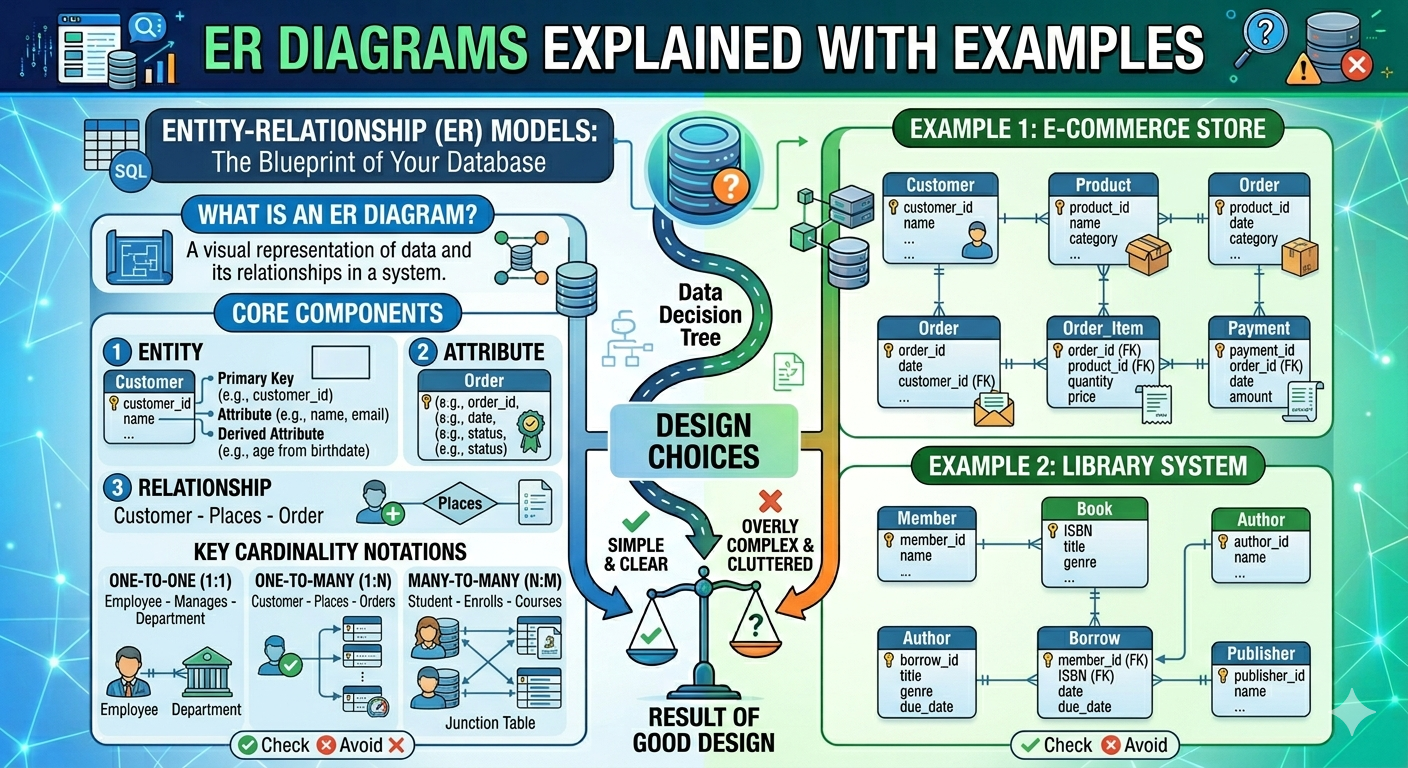
Use Primary Keys and Foreign Keys - Each entry in a table can be uniquely identified by its primary key. Foreign keys establish relationships across tables by referencing the primary keys. These keys enable relevant data to be linked without duplicating the original information.
Design Proper Relationships - Use one-to-one, one-to-many, and many-to-many relationships to represent data connections. Proper relationships eliminate the need to duplicate the same values across multiple tables.
Apply Database Constraints - Constraints such as UNIQUE, NOT NULL, and FOREIGN KEY help data integrity and prevent accidental duplicate entries.
Over-Normalization or De-normalization
Over-normalization happens when data is split into too many small tables, causing unnecessary complexity in a database while reducing redundancy. Queries now require multiple JOIN operations, which complicates SQL statements, reporting, and may reduce performance, especially with large datasets. For example, in an e-commerce database, if customer information is separated into various tables (customers, customer_names, customer_addresses, etc.), retrieving a single customer profile may require connecting all of these databases, increasing query complexity and slowing performance.
How to Avoid Over-Normalization
Normalize to a practical level, typically up to Third Normal Form (3NF) for most applications.
Group attributes that logically belong together.
Evaluate how often the data is queried and updated.
Use denormalization selectively when performance or reporting benefits outweigh the cost.
Test query performance with realistic data volumes.
Keep the design understandable and maintainable.
Lack of Indexing
Indexing is one of the most essential approaches for improving database performance. An index is a special of data structure that enables the database to locate rows much faster, similar to how the index in the back of a book allows you to quickly identify a given topic without having to read every page.
When a table has only a few records, queries may appear to run rapidly even without indexes. However, if the database expands to thousands or millions of rows, looking for data can become substantially more time-consuming since the database may need to scan each row in the table to find matching entries. This method is referred to as a full table scan.
How to Avoid This
To prevent performance issues caused by missing indexes:
Add indexes to columns that are frequently used in WHERE conditions.
Index columns commonly used in JOIN operations, such as foreign keys.
Consider indexing columns used in ORDER BY and GROUP BY clauses when appropriate.
Monitor slow queries using database performance tools.
Avoid creating too many unnecessary indexes, as they can slightly slow down insert and update operations.
Ignoring Constraints
One of the most common mistakes in database design is ignoring constraints. Constraints are database-level restrictions that ensure that tables only contain valid and consistent data. They operate as built-in safeguards, ensuring the quality and integrity of your data.
Many developers solely use frontend or backend validation to check user input. While application-level validation is necessary, it is not sufficient in itself. Bugs, API calls, imports, and direct database access can all evade application security. Database constraints give an extra layer of protection by applying rules regardless of how the data is entered or changed.
For example, if a student's table requires every student to have an email address, a constraint can prevent records from being saved without one. If each email address must be unique, another constraint ensures that duplicate email addresses cannot be inserted.
Types of Constraints
NOT NULL
The NOT NULL constraint ensures that a column must always contain a value and cannot be left empty. For an example a customer_name field should never be blank because every customer record must have a name.
UNIQUE
The UNIQUE constraint prevents duplicate values in a column. For an example an email column in a user's table should be unique so that two users cannot register with the same email address.
CHECK
The CHECK constraint validates data against a specific condition.For an example a salary field can be restricted so that the value must be greater than zero.
FOREIGN KEY
The FOREIGN KEY constraint ensures that a value in one table matches an existing value in another table. For an example each order in an orders table must reference a valid customer_id from the customer's table.
How to Avoid This
To avoid data quality issues, define constraints directly in the database schema rather than relying only on application logic. This ensures that rules are enforced consistently, regardless of whether data is inserted through a website, mobile app, API, import process, or manual SQL statements. Using constraints improves:
Data accuracy
Data consistency
Referential integrity
Overall application reliability
Single Point of Failure / Non-Scalable Architecture
A single point of failure (SPOF) is a system component that fails, rendering the entire application or database unavailable. In database design, this typically occurs when all data is stored on a single database server with no backup server, replication, or disaster recovery plan.
If that single server fails due to hardware failure, software corruption, power outages, or assaults like ransomware, the entire software may cease to function. Users may not be able to log in, view data, place orders, or complete transactions. In severe cases, valuable business data may be permanently lost.
A non-scalable architecture is one that cannot effectively handle rising volumes of data, users, or transactions. As the application grows, the database server may become overloaded, resulting in slower queries, connection timeouts, and system crashes. What works well in a tiny application may become a significant bottleneck in a large production system.
How to Avoid This
Implement Regular Backups
Create automated daily or hourly backups so data can be restored if the server fails, data is corrupted, or records are accidentally deleted.
Use Replication
Maintain one or more replica database servers that continuously receive copies of the primary server’s data. If the primary server fails, a replica can take over.
Configure Failover
Set up automatic failover so the system switches to a standby server when the main database becomes unavailable.
Monitor Storage and Performance
Track CPU usage, memory, disk space, query times, and connection counts to identify issues before they cause outages.
Design for Scalability
Use load balancing, read replicas, partitioning, or cloud-managed databases to support increasing workloads.
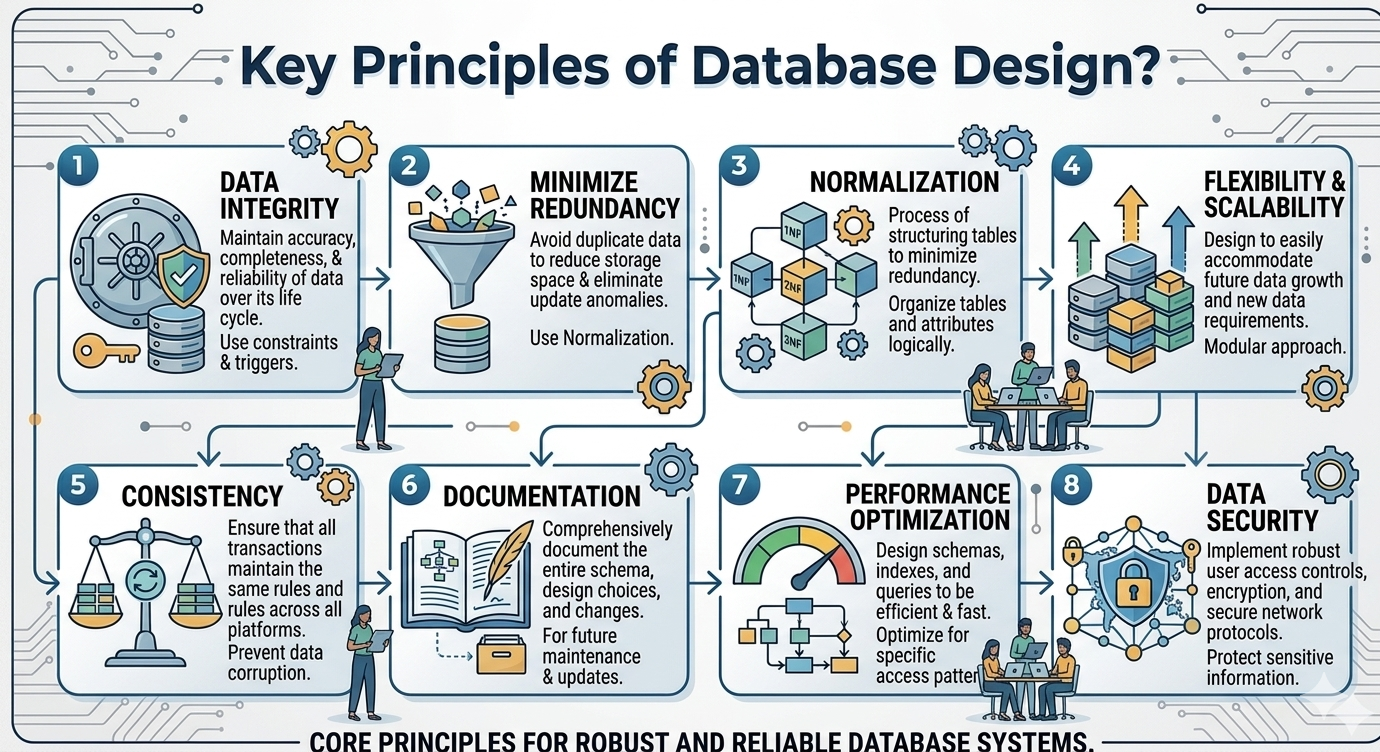
Common database design errors, such as improper naming conventions, missing keys, redundant data, a lack of indexing, and ignoring constraints, can have a substantial impact on application performance and dependability. Building efficient, maintainable, and scalable databases requires adhering to solid design principles and planning for future expansion.
Frequently Asked Questions
Althaf Mohamed
Technical Author
Software Engineer and technical author specializing in web architectures, databases, and secure distributed systems.
Trending Now
Recent Posts

Beginner's Guide to Software Development: Everything You Need to Know in 2026
May 30, 2026
TypeScript vs JavaScript - Key Differences
May 04, 2026
API Status Codes & Meanings
May 04, 2026
What is an Application Programming Interface (API)
May 04, 2026
Network Security Basics – Threats & Protection Methods
May 04, 2026