What is an IP Address
 Althaf Mohamed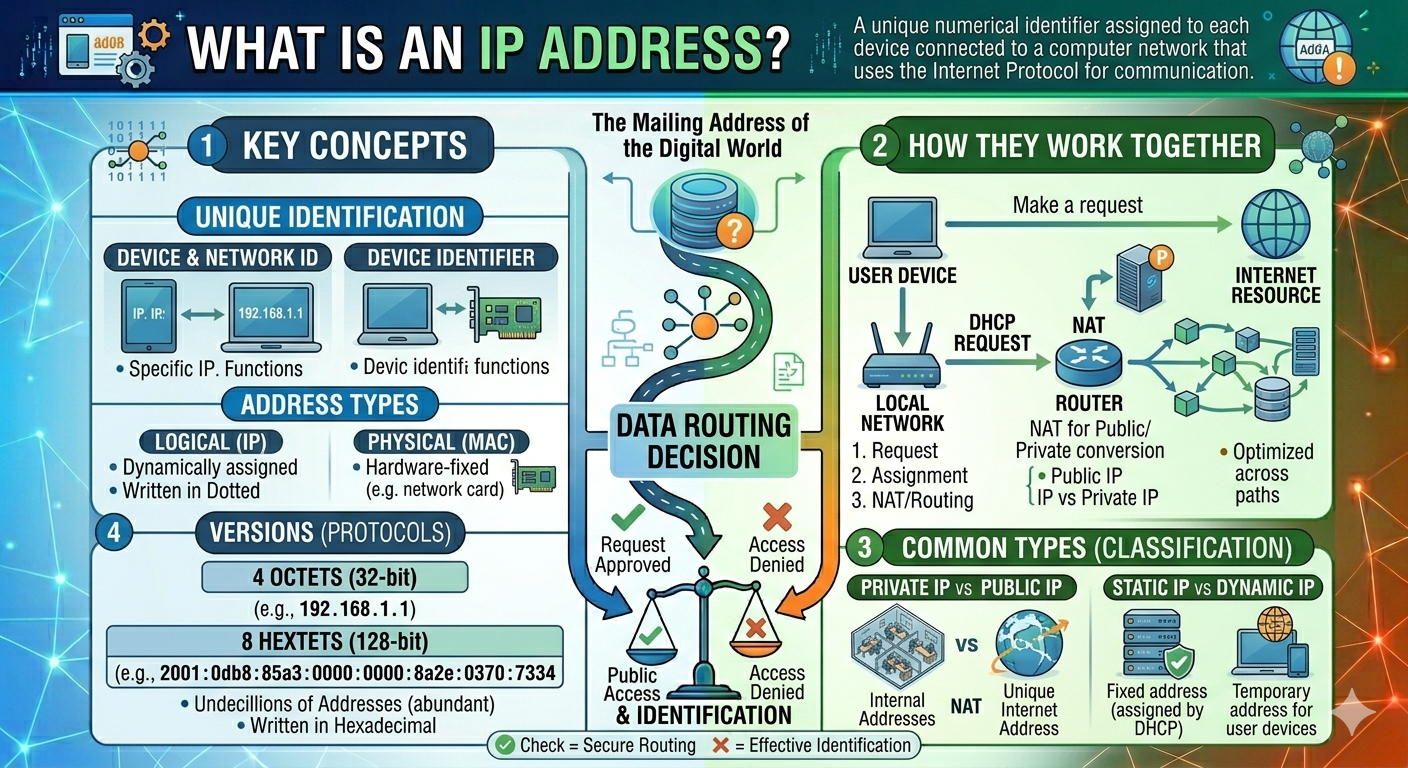
All internet-connected devices need a unique identification in order to communicate with others. This identifier is referred to as an IP address. IP addresses enable communication between devices, whether you're browsing the web, sending emails, streaming videos, or using social media.
IP addresses are among the most fundamental elements in computer networking and internet communication. They enable devices to identify and communicate with one another over local and worldwide networks.
What Is an IP Address?
An IP address (Internet Protocol Address) is a unique number provided to any device that connects to a computer network or the Internet. Devices such as computers, smartphones, tablets, printers, servers, and routers all use IP addresses to communicate with each other.
An IP address is primarily used to identify devices and allow them to exchange data over a network. Without IP addresses, devices would have no idea where to send or receive data.
An IP address serves two main purposes:
Identification → Identifies a device on a network
Location Addressing → Helps locate the device for communication
An IP address operates similarly to a home address. Just like the postal service need your home address to deliver letters or packages correctly, the internet requires an IP address to send data to the appropriate device. When you browse a website, stream videos, send emails, or use social media, IP addresses aid in the transfer of data between your device and remote servers.
Main Functions of an IP Address
Identification
Every device connecting to a network must have a unique identification. An IP address serves as that identifier and distinguishes one device from another. This ensures that data is sent to the intended device.
For example, a laptop and a mobile phone connecting to the same Wi-Fi network will have distinct IP addresses.
Location Addressing
An IP address also helps identify the location of a device within a network or on the internet. It allows routers and networking systems to determine where data should be sent.
For an example When you open a website and your device sends a request using its IP address then the website server receives the request then the server sends the website data back to your device’s IP address.
All this process happens within seconds and allows seamless internet communication.
Common Types of IP Addresses
IP addresses are categorized into many categories based on how they are assigned, used, and accessed in networks. Understanding these categories aids in comprehending how devices communicate via the internet and local networks.
Public IP Address
A public IP address is one provided by an Internet Service Provider (ISP) that allows a device or network to communicate directly with the internet.
These IP addresses are globally unique, which means that no two internet-connected devices may share the same public IP address at the same time.
Features of public IP
Accessible from the internet
Assigned by ISP
Used for online communication
Unique worldwide
For an example your home router receives a public IP address from your internet provider so that you can access websites and online services.
example of IP address - 103.21.244.0
Private IP Address
Private IP addresses are used in local networks like homes, schools, and offices. These addresses are not immediately accessible through the internet.
Private IP addresses enable devices to connect internally within a network.
Features of Private IP
Used inside local networks
Not accessible directly from the internet
Can be reused in multiple networks
Common Private IP Ranges
192.168.x.x
10.x.x.x
172.16.x.x – 172.31.x.x
For an example when multiple devices connect to your Wi-Fi network, each device receives a private IP address from the router.
example of IP address - 192.168.1.10
Static IP Address
A Static IP Address is a permanent IP address that does not change over time. It is manually configured or permanently assigned to a device.
Features of Static IP
Fixed and constant
Reliable for hosting services
Easier remote access
For an example businesses often use static IP addresses for web servers, email servers, CCTV remote access systems.
example of IP address - 203.0.113.25
Dynamic IP Address
A Dynamic IP Address is an IP address that changes automatically over time. These addresses are assigned using a DHCP (Dynamic Host Configuration Protocol) server. Most home internet users use dynamic IP addresses.
Features of Dynamic IP
Automatically assigned
Changes periodically
More cost-effective
Common for residential users
For an example when you restart your router, your ISP may assign a new public IP address automatically.
example of IP address - 192.168.0.15
IPv4 vs IPv6
IPv4 and IPv6 are two versions of the Internet Protocol (IP) that are used to identify devices and facilitate communication across networks and the Internet. Both serve the same objective, but have different structures, capacities, security, and functionality.
IPv4 is the older and more extensively used version, whereas IPv6 was designed to solve IPv4 restrictions, especially a shortage of accessible IP addresses.
What Is IPv4?
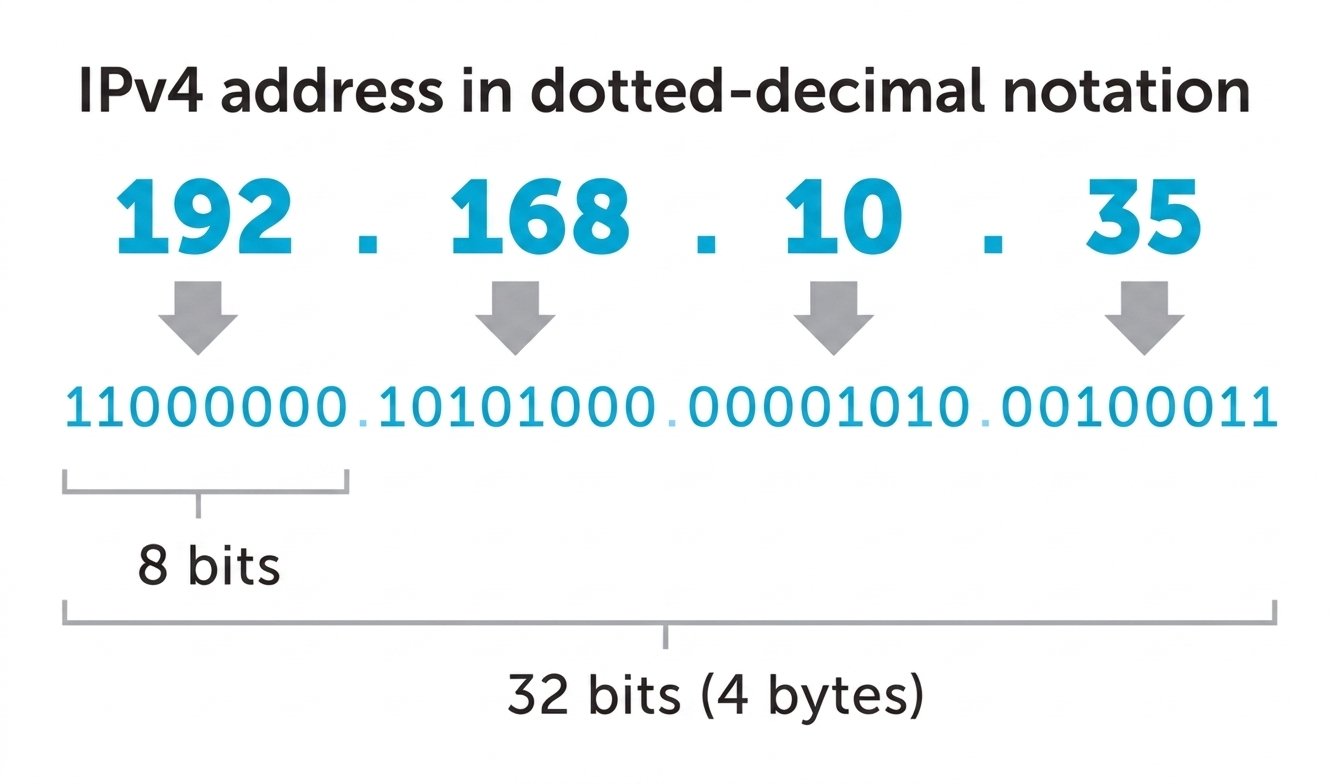
IPv4 (Internet Protocol Version 4) is the fourth version of the Internet Protocol and has long served as the standard protocol for the internet.
It uses a 32-bit address format, allowing for approximately 4.3 billion unique IP addresses.
Features of IPv4
Uses decimal numbers separated by dots
Easier to read and remember
Most commonly used today
Limited number of available addresses
What Is IPv6?
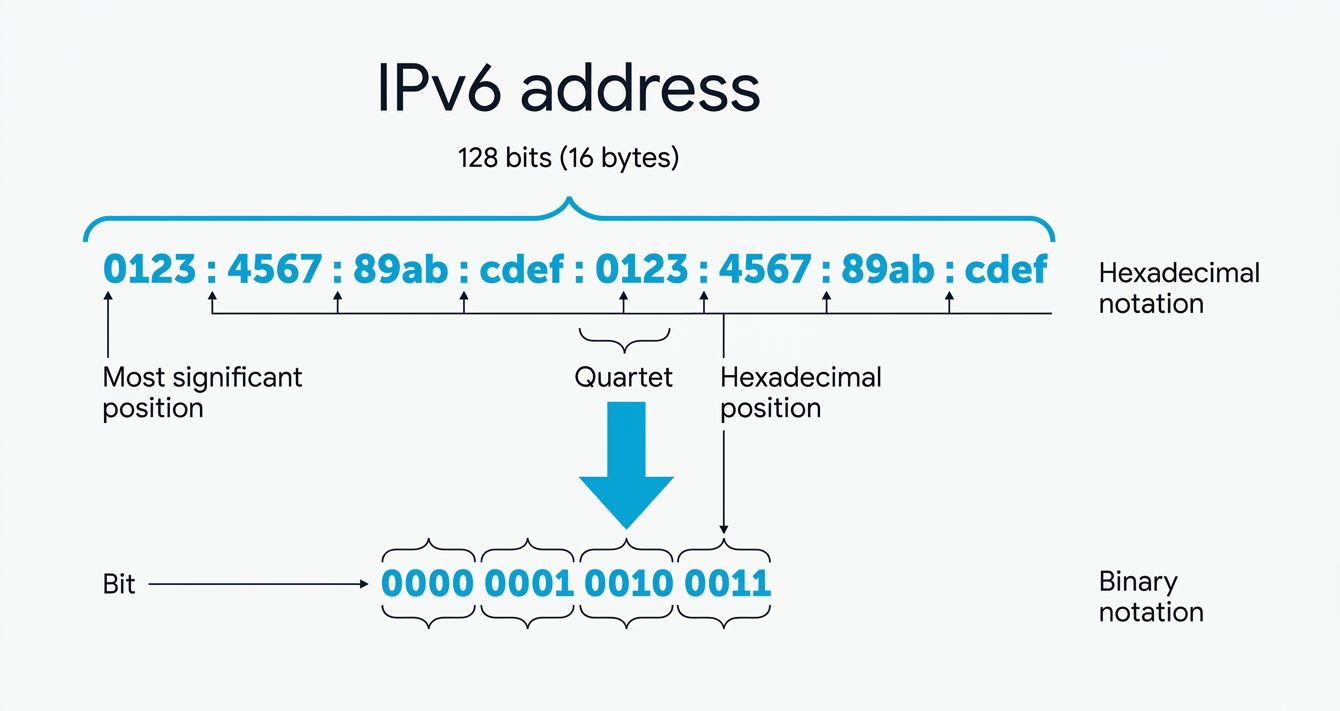
IPv6 (Internet Protocol Version 6) is the latest version of the Internet Protocol designed to replace IPv4. It uses a 128-bit address format, providing an extremely large number of unique IP addresses.
Features of IPv6
Uses hexadecimal numbers separated by colons
Supports a massive number of addresses
Improved security and efficiency
Better support for modern internet devices
IPv6 was introduced primarily to solve the depletion of IPv4 addresses caused by the rapid increase of internet-connected devices such as smartphones, laptops, smart TVs, and IoT. Its primary goals include solving IP address shortages, improving internet performance, enhancing security, and facilitating future internet expansion.
Importance of IP Addresses
IP addresses are extremely significant because they enable devices to communicate with one another over the internet and computer networks. Every network-connected device requires an IP address to properly send and receive data.
An IP address is primarily used to uniquely identify network devices. This ensures that information reaches the intended device without confusion.
IP addresses also assist with data routing. Routers and networking systems employ IP addresses to establish the best path for data transfer between devices and servers on the internet. Without IP addresses, the internet wouldn't know where to deliver data.
Another important use of IP addresses is remote access and networking. Businesses and organizations use IP addresses to connect devices, manage servers, share resources, and allow employees to access systems remotely from different locations.
IP addresses are a critical component of computer networking and internet communication. They enable devices to connect, interact, and share data over global networks. As technology and internet-connected devices evolve, IP addressing will remain an essential component of modern digital communication systems.
Frequently Asked Questions
Althaf Mohamed
Technical Author
Software Engineer and technical author specializing in web architectures, databases, and secure distributed systems.
Trending Now



Recent Posts

Beginner's Guide to Software Development: Everything You Need to Know in 2026
May 30, 2026
TypeScript vs JavaScript - Key Differences
May 04, 2026
API Status Codes & Meanings
May 04, 2026
What is an Application Programming Interface (API)
May 04, 2026
Network Security Basics – Threats & Protection Methods
May 04, 2026