TCP vs UDP - Key Differences
 Althaf Mohamed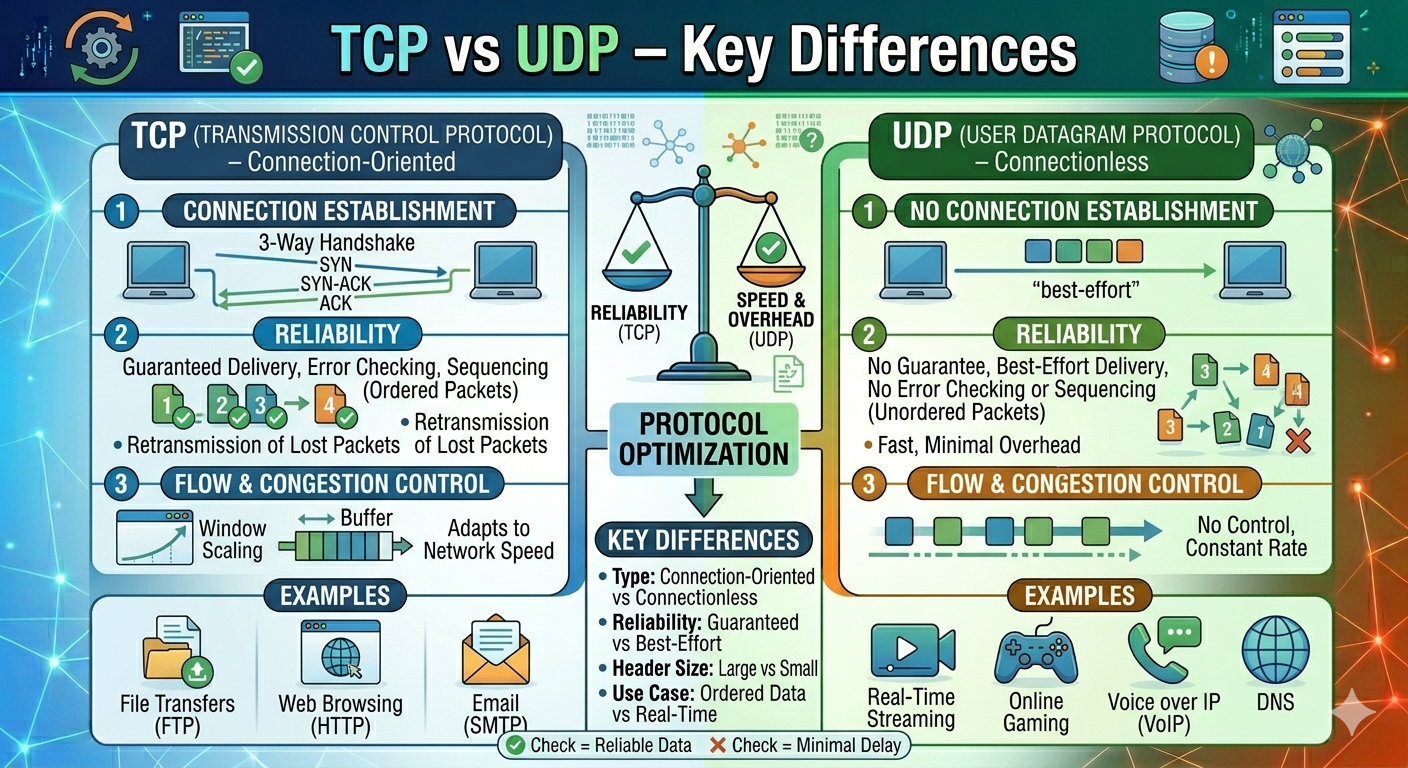
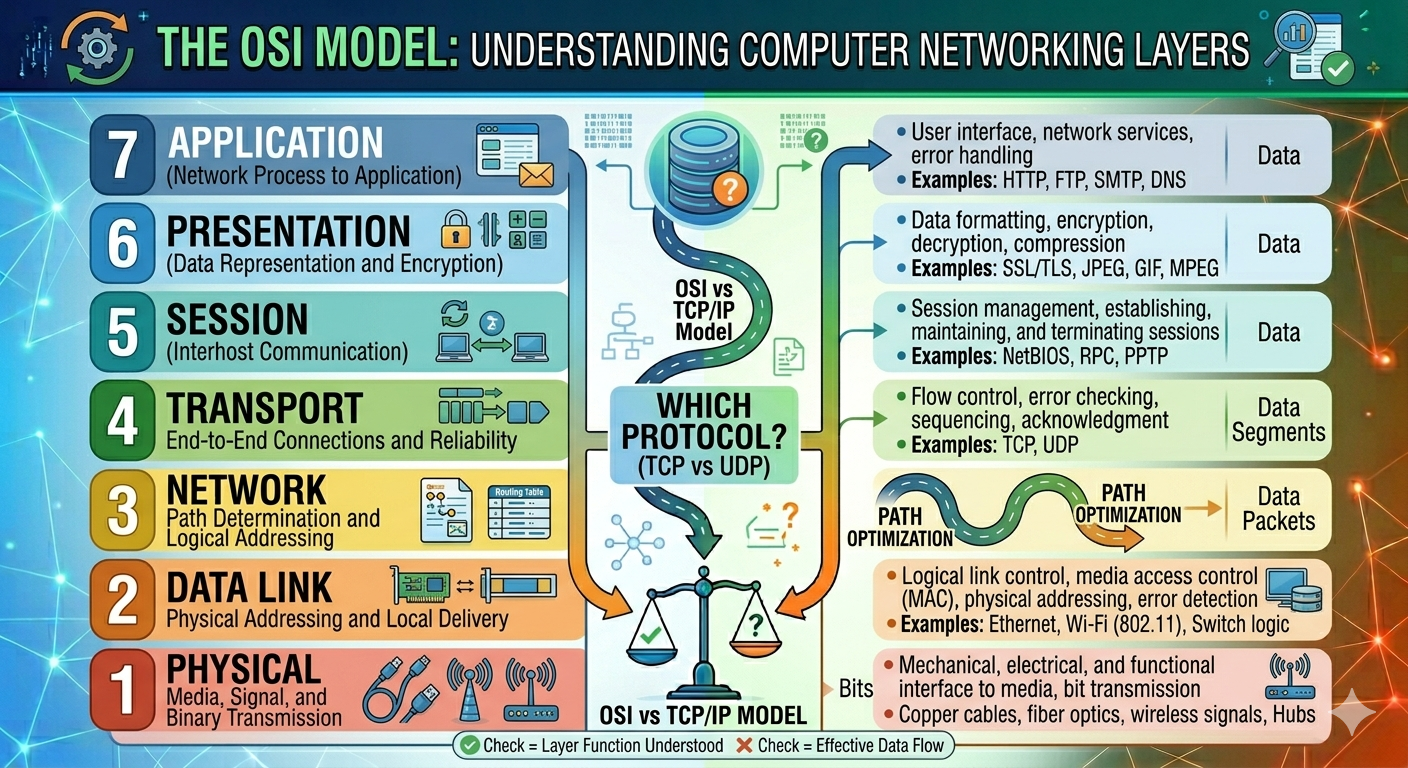
Whenever data is transmitted over a network, the Transport Layer of the OSI model is responsible for delivering that data between devices. Two of the most important protocols used at this layer are TCP (Transmission Control Protocol) and UDP (User Datagram Protocol).
Both TCP and UDP are part of the Internet Engineering Task Force’s TCP/IP protocol suite, but they work in fundamentally different ways. TCP emphasizes on reliability and accuracy, whereas UDP focuses on speed and low overhead.
What Is TCP?
TCP (Transmission Control Protocol) is a connection-oriented communication protocol that ensures data is delivered accurately, completely, and in the proper order.
Before transmitting data, TCP establishes a connection between the sender and the receiver. It ensures reliable communication through acknowledgments, sequencing, and retransmission.
Key Characteristics of TCP
Connection-Oriented
TCP is a connection-oriented protocol, which means it first starts a communication session between the sender and the receiver before transmitting any data. This connection is established using the three-way handshake protocol. Once the connection is established, both devices will sustain the session until all data has been successfully sent. This provides stable and organized communication.
Reliable Data Delivery
One of the most significant aspects of TCP is reliability. TCP ensures that data reaches its destination successfully. If a packet is lost during transmission, TCP will automatically detect and retransmit it. This makes TCP useful for applications that require high data accuracy.
Error Detection and Correction
TCP includes mechanisms for detecting errors during transmission via checksums. Each data segment includes error-checking information. If the receiving device detects corrupted or incomplete data, TCP requests that the sender retransmit the affected segment. This helps to ensure data integrity.
Data Arrives in Order
When large volumes of data are transferred, TCP divides it into smaller parts and provides a sequence number to each. Even if segments arrive out of order, TCP rearranges them before sending them to the application. This assures that files, webpages, and messages are restored exactly as they were sent.
Flow and Congestion Control
TCP manages the rate of data transfer to avoid overloading the receiving device or congesting the network. Flow control ensures that the sender does not send data faster than the receiver can handle it. Congestion control slows transmission speed when the network is becomes busy, hence enhancing overall network stability and performance.
Common Uses of TCP
Web Browsing (HTTP/HTTPS)
When you visit a website, protocols like HTTP and HTTPS use TCP to ensure that webpages, images, scripts, and other resources are delivered completely and in proper order. Missing or corrupted data may cause webpages to load incorrectly; therefore, dependability is critical.
Email (SMTP, IMAP, POP3)
Email protocols rely on TCP to deliver and receive messages correctly. TCP ensures that email content, attachments, and metadata arrive without loss or corruption.
File Transfers (FTP)
File Transfer Protocol (FTP) use TCP to ensure that all sections of a file are correctly sent. If a part is missing, TCP retransmits it, ensuring that the downloaded or uploaded file is complete and usable.
Online Banking
Banking systems use TCP because financial transactions require complete accuracy and security. Account balances, payment details, and transaction confirmations must arrive exactly as sent without any loss.
Database Communication
TCP connections are commonly used to communicate between applications and database servers. Queries, updates, and transaction data must all be given reliably in order to maintain data consistency and avoid corruption.
How TCP Works
TCP (Transmission Control Protocol) is intended to ensure dependable communication between two devices. TCP uses a process known as the three-way handshake to establish a secure and organized connection before sending any actual data. This step ensures that both the client and the server are ready to communicate and exchange data reliably.
Step 1: SYN (Synchronize)
The communication process begins when the client sends a SYN packet to the server. This packet is a request to establish a connection and contains an initial sequence number that will be used to track the data segments.
For an example when a website is opened in a browser, the computer sends a SYN packet to the web server to initiate a connection.
Step 2: SYN-ACK (Synchronize-Acknowledgment)
After receiving the SYN request, the server replies with a SYN-ACK packet. SYN signals that the server also wants to establish the connection. The ACK indicates that the server received the client's SYN packet successfully. This response informs the client that the server is ready for communication.
Step 3: ACK (Acknowledgment)
Finally, the client sends an ACK packet back to the server to confirm receive of the SYN-ACK response. At this stage, the TCP connection has been fully established, and both devices can begin exchange data.
Data Transmission After Connection Is Established
Once the connection is established, TCP divides the data into smaller pieces known as segments. Each segment is assigned a sequence number, allowing the receiving device to reassemble the data in the proper order, detect missing segments., request a retransmission if needed.
The receiver sends acknowledgments (ACKs) to confirm successful delivery. If a segment is lost or corrupted during transmission, TCP automatically retransmit it. This mechanism ensures that all data is delivered accurately and completely.
For example, imagine a comparison between the Transmission Control Protocol (TCP) and the process of sending documents via courier service. It starts with a request for pickup (SYN), where the sender contacts the courier. Next the couriers confirms (SYN-ACK) that they are ready to collect the packages. When the sender confirms to agree (ACK) by handing over the package, the delivery process begins during delivery the package is labeled and tracked. During its journey, and each stage is recorded by the courier. In case if the package is lost, the courier investigates and resends it if necessary. The delivery is confirmed once the recipient signs for the package.
This systematic tracking and acknowledgment process is similar to TCP communication, in which data is methodically recorded, confirmed, and retransmitted if something goes wrong.
What Is UDP?
UDP (User Datagram Protocol) is a connectionless communication protocol that delivers data without establishing a formal connection.
UDP does not ensure delivery, ordering, or error recovery. Instead, it focuses speed and efficiency, making it ideal for real-time applications where occasional data loss is acceptable.
Key Characteristics of UDP
Connectionless
UDP (User Datagram Protocol) is a connectionless protocol, which means it sends data without first establishing a dedicated connection between the sender and the receiver. Unlike TCP, UDP transfers packets, known as datagrams, straight to their destination. This eliminates the need for connection setup procedures like the TCP three-way handshake, resulting in faster and more efficient communications.
Faster Transmission
Because UDP does not require acknowledgment or confirmation from the receiving device, data can be transmitted instantly. This significantly decreases communication delays, making UDP appropriate for applications that prioritize speed above perfect reliability, such as live video streaming and online gaming.
Low Overhead
UDP has a much smaller and simpler header than TCP. It excludes other methods like sequencing, retransmission, flow control, and congestion control. As a result, less processing power and bandwidth are required, making UDP ideal for high-speed communication.
No Guaranteed Delivery
UDP does not verify that packets arrive at their destination. If a packet is lost due to network congestion or other reasons, UDP does not try to resend it. This means that some data may be lost during transmission, but in many real-time applications, minor packet loss is acceptable.
No Sequencing or Retransmission
UDP does not assign sequence numbers to ensure packets arrive in the correct order, nor does it retransmit missed packets. Packets may arrive in the wrong order or not at all. This trade-off enables UDP to prioritize speed above reliability.
Common Uses of UDP
Live Video Streaming
Live sports broadcasts and real-time video streams frequently employ UDP since small data loss is less visible than retransmission delays. It is more important for the video to continue playing smoothly than for every packet to arrive perfectly.
Online Gaming
Multiplayer games require quick communication between players and game servers. UDP allows game data, such as player movements and actions, to be transferred with reduced latency, resulting in a more responsive gaming experience.
Voice over IP (VoIP)
Internet calling applications send audio in real time. UDP is preferred because slight packet loss is usually less disruptive than the delays that would result from retransmitting missed packets.
DNS Queries
The Domain Name System frequently used UDP to transform domain names into IP addresses. DNS requests are often small and require quick responses, hence UDP is an efficient option.
IoT Devices
Internet of Things devices such as sensors and smart appliances often send small, frequent data packets. UDP's lightweight design saves resources and enables efficient communication in contexts with limited processing power and bandwidth.
How UDP Works
UDP (User Datagram Protocol) is a connectionless protocol, which implies that data is sent directly to the destination without first establishing a dedicated connection between the sender and receiver.
Unlike TCP, UDP does not perform a handshake process before transmitting data. The sender simply packages the information into small units called datagrams and sends them across the network immediately. It encapsulates the information into packets called datagrams, which include the source port number, destination port number, length, checksum for basic error detection, and the data payload.
Once sent, UDP does not wait for acknowledgments from the receiver, check for successful packet delivery, retransmit lost packets, ensure the correct order of packets, or carry out flow control or congestion control. This lack of reliability mechanisms results in minimal overhead, allowing UDP to transmit data more swiftly than TCP.
For example, imagine a radio station that broadcasts live music, sending audio signals to many listeners. If a few seconds of audio are lost due to signal interference, the broadcast continues without stopping or replaying the missing audio, resulting in a minor glitch but maintaining a smooth overall experience. This scenario illustrates how User Datagram Protocol (UDP) functions: the radio station serves as the sender, the radio signals represent UDP datagrams, the listeners are the receivers, the brief signal loss corresponds to lost packets, and the continuous broadcast signifies that there is no retransmission of lost data. UDP emphasizes uninterrupted delivery rather than perfect accuracy.
Why UDP Is Faster
UDP is faster than TCP because it bypasses several steps that TCP uses to ensure reliable data transmission. TCP requires time for establishing connections, tracking the order of packets, waiting for acknowledgments, and resending lost packets. In contrast, UDP directly sends data without these processes, making it suitable for applications where speed takes precedence over reliability.
TCP vs UDP – Comparison Table
Feature | TCP (Transmission Control Protocol) | UDP (User Datagram Protocol) |
|---|---|---|
Connection Type | Connection-oriented. A connection is established between the sender and receiver before data transmission begins. | Connectionless. Data is sent immediately without establishing a connection first. |
Reliability | Highly reliable. TCP ensures that every data packet is delivered successfully. | Less reliable. UDP does not ensure that packets will reach their destination. |
Data Order | Preserves packet order. Data arrives in the exact sequence it was sent. | Does not ensure the order. Packets may come out of sequence. |
Error Recovery | Detects lost packets and retransmits them automatically. | Detects errors only minimally and does not retransmit lost packets. |
Speed | Slower due to acknowledgments, retransmissions, and connection setup. | Faster since no connection is established or retransmitted. |
Overhead | Higher overhead due to sequence numbers, acknowledgments, and flow control mechanisms. | Lower overhead because the protocol header is small and simple. |
Flow Control | Supports flow control to avoid overloading the receiver. | Does not have flow control. |
Congestion Control | Includes congestion control to reduce network overload. | Does not include congestion control. |
Header Size | Minimum header size of 20 bytes. | Header size of only 8 bytes. |
Acknowledgments | Requires acknowledgments to confirm successful delivery. | No acknowledgments are used. |
Connection Setup | Uses the three-way handshake (SYN, SYN-ACK, ACK). | No handshake is required. |
Broadcast/Multicast Support | Does not support broadcast or multicast communication directly. | Supports broadcast and multicast efficiently. |
Best Used For | Applications where data accuracy and completeness are critical. | Applications where speed and low latency are more important than perfect delivery. |
Common Protocols / Applications | HTTP, HTTPS, FTP, SMTP, POP3, IMAP, SSH, Telnet, MySQL, PostgreSQL. | DNS, DHCP, SNMP, TFTP, RTP, VoIP, live streaming, online gaming. |
Real-World Example | Online banking, file downloads, email systems, and e-commerce transactions. | Video calls, multiplayer games, live sports streaming, and DNS lookups. |
TCP is the best choice when accuracy, reliability, and ordered delivery are essential. UDP is the best choice when low latency and speed are more important than guaranteed delivery.
TCP and UDP are two fundamental transport protocols used in networking. TCP provides reliable, ordered, and error-checked communication, making it ideal for applications where data integrity is essential. UDP offers faster, lightweight communication, making it perfect for real-time applications such as streaming, gaming, and voice calls.
Frequently Asked Questions
Althaf Mohamed
Technical Author
Software Engineer and technical author specializing in web architectures, databases, and secure distributed systems.
Trending Now
Recent Posts

Beginner's Guide to Software Development: Everything You Need to Know in 2026
May 30, 2026
TypeScript vs JavaScript - Key Differences
May 04, 2026
API Status Codes & Meanings
May 04, 2026
What is an Application Programming Interface (API)
May 04, 2026
Network Security Basics – Threats & Protection Methods
May 04, 2026